
IPTV Multicast vs Unicast: What's the Difference?
Covers: One-to-many vs one-to-one delivery · Bandwidth consumption metrics · IGMP snooping & PIM routing · Live TV vs VOD scaling · ISP network design in 2026
📋 Table of Contents
- 1. Introduction: IPTV Multicast vs Unicast — Understanding the Difference
- 2. What Is IPTV Multicast?
- 3. How Does Multicast Streaming Work?
- 4. What Is IPTV Unicast?
- 5. How Does Unicast Streaming Work?
- 6. The Main Differences Between Multicast and Unicast
- 7. Multicast vs Unicast: Bandwidth Consumption
- 8. Performance, Scalability, and Network Efficiency
- 9. How IGMP Works in IPTV Multicast
- 10. The Role of Routers and Network Switches
- 11. Multicast and Unicast in Live TV Streaming
- 12. Which Technology Is Better for Video on Demand?
- 13. IPTV Multicast vs Unicast: Real-World Examples
- 14. Advantages and Disadvantages of Each Technology
- 15. Can IPTV Use Both Multicast and Unicast?
- 16. Common IPTV Multicast and Unicast Problems
- 17. Frequently Asked Questions (FAQ)
- 18. Final Conclusion
1. Introduction: IPTV Multicast vs Unicast — Understanding the Difference
When you sit down in your living room and turn on your favorite television series, an exhilarating Premier League derby on our live sports streaming channels, or an on-demand 4K movie, millions of digital packets are transmitted across optical fiber lines, core network routers, and residential gateways directly into your screen. Yet, behind the seamless playback of modern IPTV lies an essential architectural question: how does the television signal actually travel across the network from the streaming source to your playback device?
In telecommunications and computer networking, internet video delivery is primarily governed by two foundational models: multicast and unicast. While both technologies deliver crystal-clear digital video, their underlying transport mechanisms, resource requirements, and server loads represent radically opposite engineering approaches. Choosing between multicast and unicast defines how internet service providers (ISPs) engineer their physical backbones, how Content Delivery Networks (CDNs) scale their distribution nodes, and why your streams either load instantly or occasionally stutter during peak hours.
Whether you are setting up a private home streaming lab, configuring high-performance players via our IPTV installation and setup guide, or managing enterprise networks, understanding the differences between IPTV Multicast vs Unicast is fundamental to mastering streaming performance in 2026. This comprehensive technical guide breaks down both protocols, dissects their bandwidth mathematics, explores their routing protocols, and examines why the future of high-definition video relies on a clever fusion of both technologies.
2. What Is IPTV Multicast?
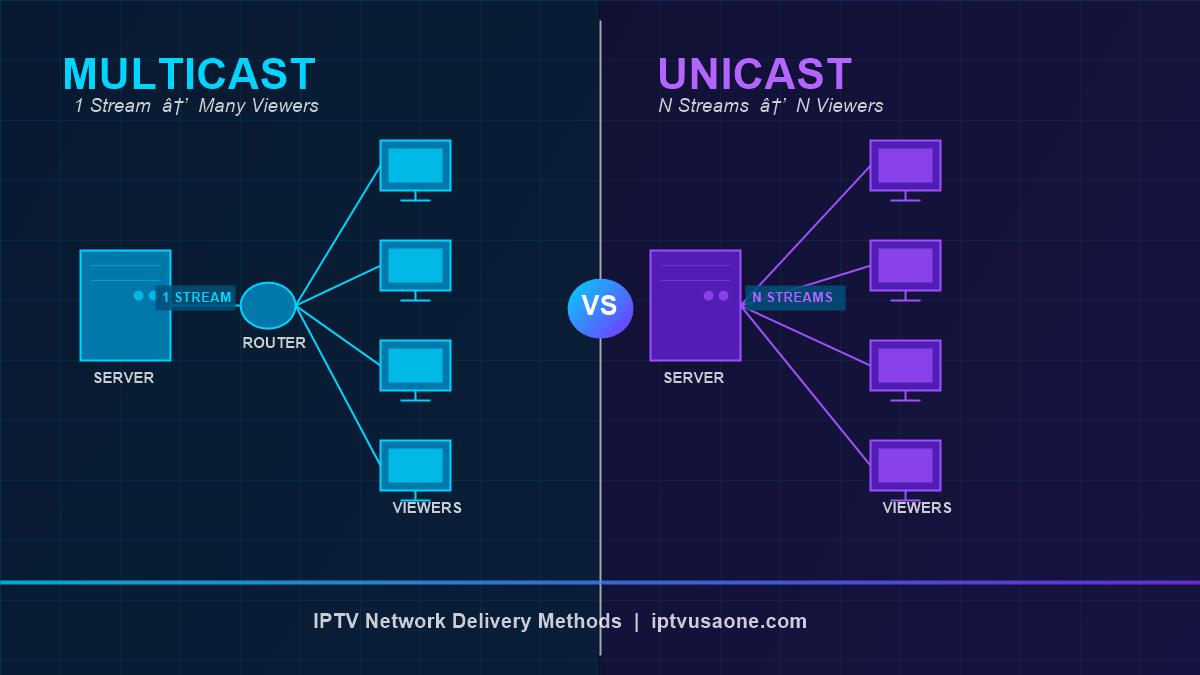
IPTV Multicast is a network delivery method based on a one-to-many communication model. In a multicast architecture, a central broadcast server sends out a single copy of a multimedia stream. That solitary data stream travels through the network backbone, where multicast-aware routers and layer-2 switches intelligently replicate the data packets only at branching junctions where active subscribers reside.
To grasp this concept, consider a standard television transmitter broadcasting over terrestrial radio waves: whether five people or five million people tune their television antennas to the channel, the transmitter continues broadcasting just one electromagnetic signal. Multicast applies this exact conservation principle to packet-switched IP networks.
A common misconception among beginners is equating multicast with broadcast. In a true network broadcast (such as an ARP request sent to 255.255.255.255), data packets are unconditionally delivered to every single host on the local subnet, regardless of whether the recipient requested it. In contrast, multicast targets a specific group address (IPv4 Class D range 224.0.0.0 to 239.255.255.255). Network switches only forward packets to ports where a device has explicitly registered interest, preventing unnecessary network congestion.
Because packet replication occurs inside the network hardware rather than at the media server, multicast places almost zero strain on the origin encoder. A single 10 Mbps 4K video channel consumes exactly 10 Mbps of server egress, whether it serves ten viewers in a single apartment building or two million subscribers watching a live presidential debate nationwide.
3. How Does Multicast Streaming Work?
The operational mechanics of IPTV multicast rely on a structured hierarchy of IP addressing, client subscription signaling, and tree-based packet routing across network hops. The end-to-end workflow follows several coordinated stages:
- Class D Multicast Group Addressing: Every live IPTV channel is assigned a unique IP multicast group address within the administratively scoped range (typically
239.0.0.0/8for private operator networks, in accordance with IETF standards). - Continuous Headend Ingestion: The IPTV headend encoder captures the uncompressed broadcast feed, compresses it using modern codecs such as HEVC/H.265 or AV1, encapsulates it into MPEG Transport Stream (MPEG-TS) packets over UDP or RTP, and injects a single continuous stream toward the core network.
- Group Membership Signaling: When a subscriber selects a channel on their set-top box or smart TV, the client sends an IGMP Join message to its local default gateway router.
- Multicast Distribution Tree (MDT) Construction: Intermediate routers utilize protocols like Protocol Independent Multicast (PIM) to construct a shortest-path forwarding tree from the source (or rendezvous point) to the requesting edge router.
- Packet Replication at Branch Points: As the stream flows downstream, routers replicate the IP packets at each fork in the topology where downstream subscribers are waiting. If no active viewers exist on a specific switch port or neighborhood node, the stream is pruned and never forwarded over that physical wire.
4. What Is IPTV Unicast?
IPTV Unicast represents the traditional, ubiquitous one-to-one communication model that underpins standard web browsing, email delivery, and the vast majority of consumer Over-The-Top (OTT) streaming platforms. In a unicast streaming environment, whenever a user clicks "Play", their media application initiates a distinct, personalized network connection with the streaming server or edge cache node.
If one thousand subscribers decide to watch the same live basketball game via unicast, the streaming infrastructure must originate, package, and transmit one thousand completely independent streams across the network. If each stream requires 8 Mbps of bandwidth, the media server farm must supply 8,000 Mbps (8 Gbps) of concurrent outbound throughput.
While this sounds resource-intensive for massive live events, unicast possesses an unbeatable advantage: individual session autonomy. Because the communication pipeline is dedicated exclusively to one client, the server and client can interact dynamically in real time. This makes unicast the native foundation for interactive entertainment on our premium IPTV service, allowing viewers to start movies whenever they choose, pause for breaks, jump backward, or automatically adapt picture quality to fluctuations in their home Wi-Fi connection.
5. How Does Unicast Streaming Work?
Modern IPTV unicast does not typically push raw continuous UDP packets. Instead, it relies heavily on HTTP Adaptive Bitrate (ABR) streaming protocols such as HLS (HTTP Live Streaming), MPEG-DASH (Dynamic Adaptive Streaming over HTTP), and CMAF (Common Media Application Format).
The unicast streaming pipeline operates across several key stages:
- Video Segmentation & Multi-Bitrate Encoding: The video encoder takes the source feed and slices it into uniform temporal chunks (typically 2 to 6 seconds long). Each chunk is simultaneously encoded at multiple resolutions and bitrates (e.g., 1080p at 6 Mbps, 720p at 3 Mbps, 480p at 1.2 Mbps).
- Manifest Generation: The server continuously updates a manifest or playlist file (such as an
.m3u8or.mpdindex). This file catalogs the available chunk URLs, resolutions, audio tracks, and encryption keys. - Client Manifest Retrieval: When the user opens the channel or VOD asset in an IPTV player, the client queries the server's manifest over standard HTTP/HTTPS (ports 80 and 443).
- Pull-Based Chunk Fetching: The client software acts as the driver. It actively requests sequential media segments over TCP or HTTP/3 (QUIC). If local network throughput dips, the player seamlessly requests the subsequent chunk at a lower bitrate without interrupting playback.
- CDN Edge Caching: Global Content Delivery Networks (like Cloudflare, Akamai, and Fastly) cache these small video segments on edge servers geographically proximate to the user, absorbing much of the origin server load.
If your device ever experiences intermittent interruptions while fetching these unicast chunks, our comprehensive guide on how to fix IPTV buffering and freezing provides an in-depth breakdown of player cache buffers, TCP window sizes, and Wi-Fi band selection.
6. The Main Differences Between Multicast and Unicast
To clearly see how these two delivery methodologies contrast, let us examine their structural, operational, and network characteristics side by side.
| Feature | IPTV Multicast | IPTV Unicast |
|---|---|---|
| Communication Model | One-to-Many (1:N) point-to-multipoint | One-to-One (1:1) point-to-point |
| Number of Server Streams | Single stream per channel regardless of viewer count | Individual, dedicated stream session per viewer |
| Bandwidth Consumption | Fixed and predictable; invariant to subscriber volume | Linear scaling; Bandwidth = (Bitrate × Number of Viewers) |
| Scalability | Practically infinite on managed network infrastructure | Limited by server egress, CDN capacity, and transit peering |
| Network Requirements | Requires private, managed network with IGMP & PIM routing | Runs over standard public internet infrastructure and open web ports |
| Router & Switch Config | Demands IGMP Snooping, Queriers, and PIM Sparse Mode | Standard layer-3 IP routing; no specialized multicast settings |
| Live TV Suitability | Exceptional; ultra-low latency and zero congestion during peak events | Good, but requires massive CDN caching infrastructure to handle spikes |
| Video on Demand (VOD) | Unsuitable; cannot provide personalized, asynchronous playback | Native and ideal; supports arbitrary start times, scrub, and pause |
| Individual Playback Control | None (all viewers see the identical live broadcast frame simultaneously) | Full control (pause, rewind, fast-forward, speed adjustment, bookmarks) |
| Adaptive Bitrate (ABR) | Difficult; all group members receive the same stream resolution | Native; dynamically switches bitrates based on client connection speed |
| Typical IPTV Use Cases | Telco/ISP managed linear TV, broadcast headends, hotel IPTV systems | OTT streaming apps, web players, VOD libraries, mobile IPTV streaming |
7. Multicast vs Unicast: Bandwidth Consumption
The mathematical divergence between multicast and unicast bandwidth consumption is the primary reason why network architects obsess over their differences. In network engineering, capacity planning determines whether an ISP's physical links survive a major broadcast or collapse under congestion.
The Linear Expansion of Unicast Bandwidth
Under a unicast distribution model, total bandwidth consumption ($B_{total}$) scales directly with the number of concurrent active viewers ($N$) multiplied by the encoding bitrate of the stream ($R$):
For an Over-The-Top IPTV provider serving a massive audience during an international sporting final, delivering 1.5 Tbps of concurrent live data requires substantial CDN agreements, multi-datacenter origin load balancing, and significant operating expenditure.
The Constant Stability of Multicast Bandwidth
In stark contrast, multicast transmission decoupling removes subscriber volume from the bandwidth equation across the core and distribution layers of the network:
Whether one person is tuned into the channel or the entire metropolitan area is watching, the load on the service provider's backbone routers remains identical: a solitary 15 Mbps stream. Bandwidth is consumed strictly on the "last mile" access drop leading to the customer's specific living room, ensuring maximum network efficiency.
8. Performance, Scalability, and Network Efficiency
When assessing overall streaming performance, throughput is only one piece of the puzzle. Network architects must also balance glass-to-glass latency, channel change zapping times, and packet loss resilience.
Latency: Real-Time vs Segmented Buffering
Multicast streams running over UDP/RTP typically operate with broadcast-grade glass-to-glass latency of 1 to 3 seconds, rivaling traditional digital cable (QAM) and satellite (DVB-S2). When a goal is scored in a football match, multicast viewers hear the stadium roar virtually in real time.
Standard unicast ABR streaming over HTTP, on the other hand, historically suffered from 15 to 45 seconds of latency because players must download two or three full video chunks into their buffer before beginning playback. While Low-Latency HLS (LL-HLS) and Low-Latency DASH (LL-DASH) using chunked transfer encoding have narrowed this window in 2026 to around 3 to 5 seconds, unicast players remain inherently more vulnerable to latency accumulation when network jitter forces buffer expansions.
Channel Zapping Speed
Channel changing speed (often called "zapping delay") is a crucial metric for subscriber satisfaction. In a multicast system, changing a channel involves sending an IGMP Leave for the current group and an IGMP Join for the next, followed by waiting for the next video keyframe (I-frame). If an ISP's network incorporates Fast Channel Change (FCC) servers that temporarily unicast an immediate I-frame burst, zapping times drop below 300 milliseconds.
In unicast HTTP streaming, changing channels requires terminating a TCP connection, resolving DNS, requesting a new manifest file, parsing available bitrates, and buffering the first segment. If you've ever experienced delays or errors during channel switching, explore our guide to fixing IPTV authorization and playlist loading errors for client-side configuration tips.
9. How IGMP Works in IPTV Multicast
The operational backbone of IPv4 multicast in residential IPTV networks is the Internet Group Management Protocol (IGMP), formalized through IETF standards (most notably RFC 3376 and RFC 9776 covering IGMPv3). In IPv6 deployments, this function is performed by Multicast Listener Discovery (MLD).
IGMP operates exclusively between the end-user client (the "multicast receiver") and the local default gateway router (the "multicast querier"). It employs three fundamental message types to manage TV viewing states:
- Membership Report (Join): When you switch your set-top box to a live channel, the client software transmits an unsolicited IGMP Report packet specifying the multicast IP address of that channel (e.g.,
239.192.1.45). Upon receiving this, the upstream router activates the channel feed toward that physical LAN port. - Membership Query: At regular periodic intervals (typically every 125 seconds), the designated multicast router broadcasts an IGMP General Query across the local network segment asking, "Are there any active multicast receivers remaining?" Devices currently streaming reply with an IGMP Report to keep their session alive.
- Leave Group Message: Introduced in IGMPv2, when you switch away from a channel, your set-top box sends an explicit IGMP Leave packet to
224.0.0.2(the all-routers multicast address). This alerts the router to stop sending that channel's high-bitrate video stream unless other local devices are still subscribed.
In modern IPTV deployments, IGMPv3 adds a vital security and optimization feature called Source-Specific Multicast (SSM). With IGMPv3, the receiver specifies not only the multicast group address ($G$) but also the exact source IP address ($S$) of the authorized headend encoder. This prevents unauthorized stream injection and eliminates the need for complex shared rendezvous points in core network PIM routing.
10. The Role of Routers and Network Switches
Without proper enterprise hardware configuration, multicast traffic can quickly destabilize a local area network. Here is how network devices maintain order:
The Peril of Multicast Flooding
By default, a standard layer-2 Ethernet switch does not inspect IP packet headers; it forwards frames based solely on destination MAC addresses. In the Ethernet standard, IP multicast addresses map to special multicast MAC ranges (such as 01:00:5E:xx:xx:xx). Unmanaged switches treat these unknown multicast MAC addresses identically to broadcast traffic, blindly flooding copies of high-bandwidth video packets out of every single Ethernet port on the switch.
If you connect a high-bitrate multicast IPTV stream to a basic unmanaged switch with connected Wi-Fi access points, printers, and gaming consoles, that single 15 Mbps stream will be bombarded onto every port. Wi-Fi radios will be overwhelmed by multicast packet storms, destroying wireless performance and causing devices on your local network to drop offline.
IGMP Snooping: The Essential Switch Feature
To eliminate multicast flooding, network engineers mandate the activation of IGMP Snooping on all managed switches. When IGMP Snooping is enabled, the switch's internal application-specific integrated circuit (ASIC) passively "snoops" on conversation packets passing between set-top boxes and the upstream router.
When the switch intercepts an IGMP Join packet for a specific channel, it maps that multicast stream strictly to the physical port connected to the requesting set-top box. The other ports on the switch remain completely pristine and unaffected by the video traffic.
PIM Routing Across Network Subnets
While IGMP operates locally within a single layer-2 broadcast domain, multicast packets cannot cross layer-3 subnets or WAN boundaries on their own. To route multicast traffic across the operator's regional distribution hubs, routers run Protocol Independent Multicast (PIM), typically configured in PIM Sparse Mode (PIM-SM) or PIM Source-Specific Multicast (PIM-SSM), as standardized in Cisco IP Multicast Architecture and IETF specifications.
11. Multicast and Unicast in Live TV Streaming
Live linear television is the supreme testing ground for video distribution systems. During blockbuster events—such as the FIFA World Cup, Olympic Games, or breaking global news broadcasts—hundreds of thousands of concurrent viewers tune in simultaneously to the exact same audio-video feed.
In this scenario, multicast is architecturally unmatched. Because every viewer is synchronized to the same live timeframe, the network infrastructure behaves like a single digital water pipe branching out through irrigation channels. No matter how many viewers join, the core infrastructure experiences zero additional stress. There is no risk of origin server crash, no transit peering saturation, and no video degraded by CDN traffic-throttling policies.
Conversely, live TV over unicast requires substantial engineering countermeasures. OTT platforms must coordinate distributed Content Delivery Networks, configure aggressive edge-caching rules, and deploy dynamic Anycast routing to prevent origin servers from collapsing under simultaneous socket handshakes. When unexpected spikes occur, unicast viewers may face buffering spinners or temporary resolution drops. For advice on configuring client devices for peak stability, check our walkthrough on setting up IPTV on Amazon Firestick devices.
12. Which Technology Is Better for Video on Demand?
While multicast reigns supreme for live linear broadcasting, it is fundamentally incapable of delivering modern Video on Demand (VOD). The reason lies in the nature of human viewing habits.
In a Video on Demand library—such as our catalog of movies and full TV boxsets—every subscriber is their own programmer. User A starts an action film at 8:03 PM, User B starts the same movie at 8:14 PM and pauses to answer the phone, while User C is fast-forwarding through the opening credits at 8:22 PM. Because each playback timeline is independent and asynchronous, no shared stream can satisfy all three users.
Unicast is the undisputed master of VOD:
- Independent Temporal Position: Each unicast socket connects directly to a client buffer that requests temporal video slices on demand.
- Full Trick-Play Functionality: Rewind, high-speed fast-forward, slow motion, frame skipping, and immediate seeking to timestamps are native to unicast HTTP chunk requests.
- Personalized Audio & Subtitle Multiplexing: Unicast manifests allow the client to dynamically select distinct multilingual audio streams and subtitle tracks without transmitting unnecessary tracks to every user.
- Targeted Dynamic Ad Insertion (DAI): Unicast enables ad-stitching servers to splice unique, targeted commercial advertisements tailored specifically to the individual viewer's demographic profile.
13. IPTV Multicast vs Unicast: Real-World Examples
To see these networking principles in action, let us review how prominent media platforms and telecommunication operators deploy these technologies in 2026:
1. Telco Managed IPTV (AT&T U-verse, Orange, Deutsche Telekom Magenta TV)
Traditional telecom carriers deploy IPTV over a managed IP network. They control the entire path from the television headend, through fiber optic central offices, down to the DSL or GPON residential gateway in the customer's home. These providers utilize multicast for all linear live TV channels, guaranteeing flawless 4K quality with dedicated Quality of Service (QoS) bandwidth reservations that prevent domestic internet downloads from interfering with television viewing.
2. Public Over-The-Top (OTT) Streaming (IPTV Apps, YouTube TV, Netflix)
Services operating over the public internet cannot use multicast because transit ISPs and internet exchange points (IXPs) do not route multicast across autonomous system boundaries. Consequently, these services operate entirely via unicast ABR (HLS/DASH), relying on massive worldwide CDN caching arrays to deliver high concurrency across smart TVs, smartphones, and computers anywhere in the world.
3. Enterprise, Hospitality, and Stadium Networks
Airports, luxury hotels, corporate trading floors, and sports stadiums operate private local area networks. In these environments, IT administrators configure multicast IPTV distributions to stream live news and sports displays to hundreds of wall-mounted screens across multiple buildings without saturating the corporate LAN or Wi-Fi backhaul.
14. Advantages and Disadvantages of Each Technology
IPTV Multicast Advantages
- Absolute Bandwidth Efficiency: Stream bandwidth remains constant regardless of whether 10 or 1,000,000 users are watching.
- Negligible Server Load: Origin encoders only process and transmit one stream per channel.
- Ultra-Low Broadcast Latency: Minimal buffer delay ensures true real-time viewing for sports and live breaking events.
- Guaranteed Quality of Service: When deployed on managed networks, multicast packets enjoy strict priority queuing.
IPTV Multicast Disadvantages
- Walled Garden Limitations: Does not work over the open, unmanaged public internet.
- Complex Infrastructure Requirements: Demands switches and routers with IGMP Snooping, IGMP Queriers, and PIM routing protocols.
- No Trick Play: Incapable of native pausing, rewinding, or asynchronous on-demand viewing.
- Zero Stream Personalization: Cannot easily deliver individualized streams, personalized audio mixes, or targeted ads.
IPTV Unicast Advantages
- Universal Compatibility: Operates effortlessly across any standard public internet connection, cellular network, and Wi-Fi hotspot.
- Native VOD Support: Complete trick-play controls (pause, scrub, resume) tailored to individual viewers.
- Adaptive Bitrate Streaming: Dynamic resolution scaling adjusts to fluctuating client connection speeds in real time.
- Zero Specialized Hardware: Runs over standard consumer routers and unmanaged switches without special network configuration.
IPTV Unicast Disadvantages
- Massive Bandwidth Multiplication: Network load increases proportionally with every single new subscriber.
- High Operating Costs for Major Live Events: Requires substantial CDN egress bandwidth during peak audience concurrency.
- Higher Inherent Latency: Segmented HTTP streaming introduces buffering delays compared to raw multicast RTP feeds.
15. Can IPTV Use Both Multicast and Unicast?
The short answer is yes, absolutely. In fact, virtually every major telecommunications operator in the world runs a sophisticated hybrid IPTV architecture that harnesses the strengths of both delivery modes.
In a standard hybrid architecture, the operator routes traffic through specialized policy engines:
- Linear Live TV via Multicast: When a subscriber sits in their living room watching standard broadcast TV channels, the set-top box joins the ISP's internal multicast tree, preserving core network bandwidth and providing sub-second channel switching.
- Catch-Up & Cloud DVR via Unicast: If the viewer hits "Start Over" on an in-progress program or accesses 7-day catch-up archives, the set-top box transparently leaves the multicast group and establishes an individual unicast HTTP session with the recording storage servers.
- VOD Library via Unicast: All movies, series, and on-demand assets stream directly over unicast ABR pipelines.
- Multicast-to-Unicast Gateway (mABR): Cutting-edge standards like Multicast-Assisted ABR (mABR) allow residential gateway routers to receive a single multicast stream from the ISP and convert it into local unicast HLS/DASH streams inside the home. This allows iPads, smartphones, and laptops on domestic Wi-Fi to enjoy the bandwidth efficiency of multicast without requiring multicast client support on mobile operating systems!
16. Common IPTV Multicast and Unicast Problems
Diagnosing video issues requires recognizing whether your stream operates over a multicast or unicast pipeline. Here are the most prevalent failure modes and their technical solutions:
Multicast Troubleshooting Scenarios
- 10-Second Freeze / Stream Drops: If a multicast channel plays smoothly for exactly 10 to 30 seconds and then abruptly freezes, your local switch is dropping the stream because it lacks an active IGMP Querier. The switch forgets which port requested the stream because no periodic query keeps the state alive. Enabling IGMP Snooping Querier on your core switch resolves this immediately.
- Wi-Fi Network Halting: If streaming TV causes Wi-Fi speeds across your home to grind to a complete halt, your network switch is flooding multicast frames across your wireless access points. Turn on IGMP Snooping in your router or switch administration panel.
Unicast Troubleshooting Scenarios
- Peak-Time Buffering: If streams stutter exclusively on weekday evenings during major sports fixtures, the issue is typically ISP traffic shaping or CDN edge saturation. Utilizing a high-performance VPN for IPTV streaming encrypts your traffic with modern protocols like WireGuard, preventing your internet service provider from throttling streaming packets.
- VPN Black Screens: If your unicast player displays a black screen as soon as your VPN connects, check for MTU packet fragmentation or DNS lookup failures using our detailed guide to fixing IPTV black screens with VPN.
- Audio Delay / Desync: In unicast ABR playback, rapid bitrate adaptation can occasionally cause audio and video elementary streams to drift out of alignment. If this occurs, review our troubleshooting steps for fixing audio delay and lip-sync issues on IPTV.
17. Frequently Asked Questions (FAQ)
What is the primary difference between IPTV multicast and unicast?
Multicast distributes a single shared stream to multiple interested receivers using a one-to-many model, replicating packets only at network branching routers. Unicast creates an independent, dedicated one-to-one connection between the server and each individual client device.
Why don't public internet IPTV services use multicast?
Because the public internet consists of thousands of separate commercial networks and internet exchange points that disable multicast forwarding to protect their infrastructure from denial-of-service amplification attacks and uncontrolled bandwidth flooding. Consequently, internet-based OTT IPTV relies on unicast paired with global CDNs.
Is multicast the same as broadcast streaming?
No. Broadcast sends data blindly to every connected host on a local network segment whether they want it or not. Multicast delivers data selectively and strictly to devices that have actively subscribed to a specific multicast group IP address via IGMP signaling.
Why is unicast necessary for Video on Demand (VOD)?
VOD requires individualized, asynchronous playback control—allowing viewers to start, pause, rewind, fast-forward, and select custom audio tracks whenever they choose. Multicast is synchronous (every recipient receives the identical packet at the identical millisecond), making it incompatible with personalized on-demand viewing.
What role does IGMP play in IPTV multicast?
Internet Group Management Protocol (IGMP) is the signaling language used by client set-top boxes to notify the local network router which multicast channel groups they wish to join or leave. Routers rely on IGMP messages to start or stop forwarding stream data down specific network paths.
What happens if a network switch does not support IGMP Snooping?
Without IGMP Snooping, the switch treats high-bitrate multicast video packets as broadcast frames and floods them out of every connected port. This floods Wi-Fi access points, saturates local bandwidth, and can crash smart home gadgets and computers on the local network.
Can an IPTV architecture use both multicast and unicast simultaneously?
Yes. Leading telecommunication operators deploy hybrid IPTV architectures that utilize multicast for live broadcast television channels to maximize core network efficiency, while utilizing unicast HTTP streaming for VOD catalogs, cloud DVR storage, and mobile device streaming.
Does unicast streaming cause buffering during major live sporting events?
Unicast can suffer from severe bottlenecks during massive live events if origin servers or CDN edge nodes run out of concurrent bandwidth capacity. Multicast prevents this completely on managed networks because channel bandwidth remains fixed at a single stream's bitrate, regardless of how many viewers watch.
18. Final Conclusion
When comparing IPTV Multicast vs Unicast, the question is not which technology is inherently superior, but rather which architecture is optimal for a given streaming scenario.
Multicast remains the gold standard for high-volume linear live television within private, managed telecommunication networks. Its unmatched bandwidth conservation, zero-scaling server strain, and near-zero broadcast latency make it the ultimate engineering tool for massive simultaneous events where millions of viewers share a single moment in time.
Unicast, powered by HTTP adaptive bitrate streaming and globally distributed Content Delivery Networks, is the lifeblood of the modern open internet. It delivers the personalized autonomy, trick-play flexibility, and multi-device convenience that digital audiences demand for Video on Demand, catch-up TV, and global streaming mobility.
As streaming technology continues to advance throughout 2026, the lines between these two paradigms are converging. Innovations such as Multicast-Assisted ABR (mABR) and Low-Latency CMAF demonstrate that the future of television belongs not to one protocol in isolation, but to intelligent network architectures that harness the best of both worlds. Explore our flexible IPTV subscription plans today to experience high-definition, buffer-free entertainment engineered for the modern digital era.
Ready for Premium, Buffer-Free IPTV Streaming?
Experience over 50,000+ live 4K channels and 134,000+ on-demand movies powered by state-of-the-art streaming infrastructure.
Explore Our 2026 Subscription Plans